

Cloud computing has changed the way businesses, governments, startups and individuals use technology. Instead of buying and maintaining expensive servers, organizations can access computing resources over the internet whenever they need them. This makes technology more flexible, easier to manage and more cost effective.
In 2026 cloud computing is not just an IT option anymore It has become the foundation of modern digital services. From AI and machine learning to data analytics remote work and application development many technologies depend on cloud systems.
Whether you are watching videos online, storing files using a business application, training an AI model or running company workloads, cloud computing is working in the background.
The rapid adoption of cloud technology has been driven by several factors:
- Growing demand for digital services
- Increased remote and hybrid work environments
- Expansion of AI and machine learning workloads
- Need for scalable infrastructure
- Rising cybersecurity requirements
- Demand for cost optimization through FinOps practices
According to industry reports companies around the world are increasing their cloud spending as they move from traditional on premise infrastructure to modern cloud technologies
In this guide you will learn about cloud computing its architecture deployment models service models benefits challenges latest trends in 2026 and how platforms like Utho Cloud help businesses build scalable digital infrastructure
What Is Cloud Computing?
Cloud computing is the delivery of computing services over the internet on a pay as you use model These services include computing power storage databases networking software analytics artificial intelligence and security tools
Instead of buying and maintaining physical servers organizations can rent these resources from cloud providers and scale them up or down based on their needs.
Simple Definition
Cloud computing allows users to use IT resources through the internet without owning or managing physical servers and infrastructure
Example of Cloud Computing
Imagine a startup launching a new e commerce website
Traditionally, the company would need to:
- Purchase physical servers
- Rent data center space
- Install networking equipment
- Hire IT administrators
- Maintain hardware continuously
With cloud computing the startup can quickly get virtual servers storage databases and networking resources from a cloud provider within minutes.
This helps reduce costs, saves time and makes management much easier.
Everyday Examples of Cloud Computing
Some common examples of cloud computing are:
- Using Google Drive or Dropbox to store files online.
- Watching movies on Netflix or other streaming platforms.
- Using Gmail for email services.
- Attending meetings on Zoom or Microsoft Teams.
- Using online business applications like CRM or accounting software.
These services use cloud computing in the background to provide fast and reliable access over the internet.
Evolution of Cloud Computing
Cloud computing did not develop overnight. It evolved through different stages of technology over time Each stage helped organizations manage computing resources more efficiently and at a lower cost. Understanding this evolution helps explain why cloud computing is now the foundation of modern digital infrastructure.
Traditional On Premises Infrastructure
Before cloud computing became popular organizations depended completely on on premises infrastructure This meant businesses had to buy install and maintain their own IT resources including:
- Physical servers
- Storage systems
- Networking equipment
- Security appliances
This approach gave organizations full control over their infrastructure and data but it also had many challenges. Businesses needed large upfront investments dedicated to IT teams regular hardware upgrades and continuous maintenance As the business grew, scaling the infrastructure became expensive and time consuming.
Virtualization Era
The next major advancement was virtualization. Instead of running a single operating system on one physical server, virtualization allowed multiple virtual machines (VMs) to run on the same hardware.
This innovation provided several benefits:
- Better hardware utilization
- Reduced infrastructure costs
- Improved resource allocation
- Faster provisioning of computing resources
Virtualization helped organizations maximize the value of their hardware investments and became the technological foundation for modern cloud platforms.
Public Cloud Revolution
The introduction of public cloud services changed the IT industry. Cloud providers started offering computing resources over the internet allowing businesses to use infrastructure whenever needed without buying or managing physical hardware.
Organizations no longer needed to:
- Purchase expensive servers
- Build and maintain data centers
- Manage physical infrastructure
- Handle hardware replacements and upgrades
Instead businesses could rent computing resources whenever needed and pay only for what they used This reduced costs increased flexibility and made advanced technology available to businesses of all sizes
Cloud Native Era
As cloud adoption grew organizations started building applications specifically for cloud environments instead of simply moving traditional applications to the cloud
This led to the growth of cloud native development which uses technologies such as:
- Containers
- Kubernetes
- Microservices
- Serverless computing
- DevOps automation
Cloud native architectures made applications more scalable reliable and easier to update Businesses could launch new features faster improve system stability and quickly adapt to changing market needs
AI Native Cloud Era
Today cloud computing is entering a new stage called the AI native cloud era Artificial intelligence is no longer just running on cloud infrastructure it is becoming a built in part of the cloud itself.
Modern cloud platforms now provide:
- GPU-powered infrastructure for AI workloads
- AI model training and hosting services
- Machine learning development platforms
- Generative AI capabilities
- Intelligent automation and optimization tools
Businesses are now choosing cloud providers based on how well they support AI workloads in a secure, efficient and cost effective way As AI adoption continues to grow, cloud platforms are becoming intelligent ecosystems that can automate operations, improve performance and drive innovation.
From Infrastructure to Intelligence
The evolution of cloud computing shows how technology has moved from managing physical servers to using intelligent AI powered platforms. What started as a way to reduce infrastructure costs has now become a powerful ecosystem that supports modern applications, data analytics automation and artificial intelligence on a global scale.
Today cloud computing is not just about accessing computing resources when needed It helps businesses innovate faster, remain flexible and make smarter decisions across every industry.
Cloud Computing Architecture
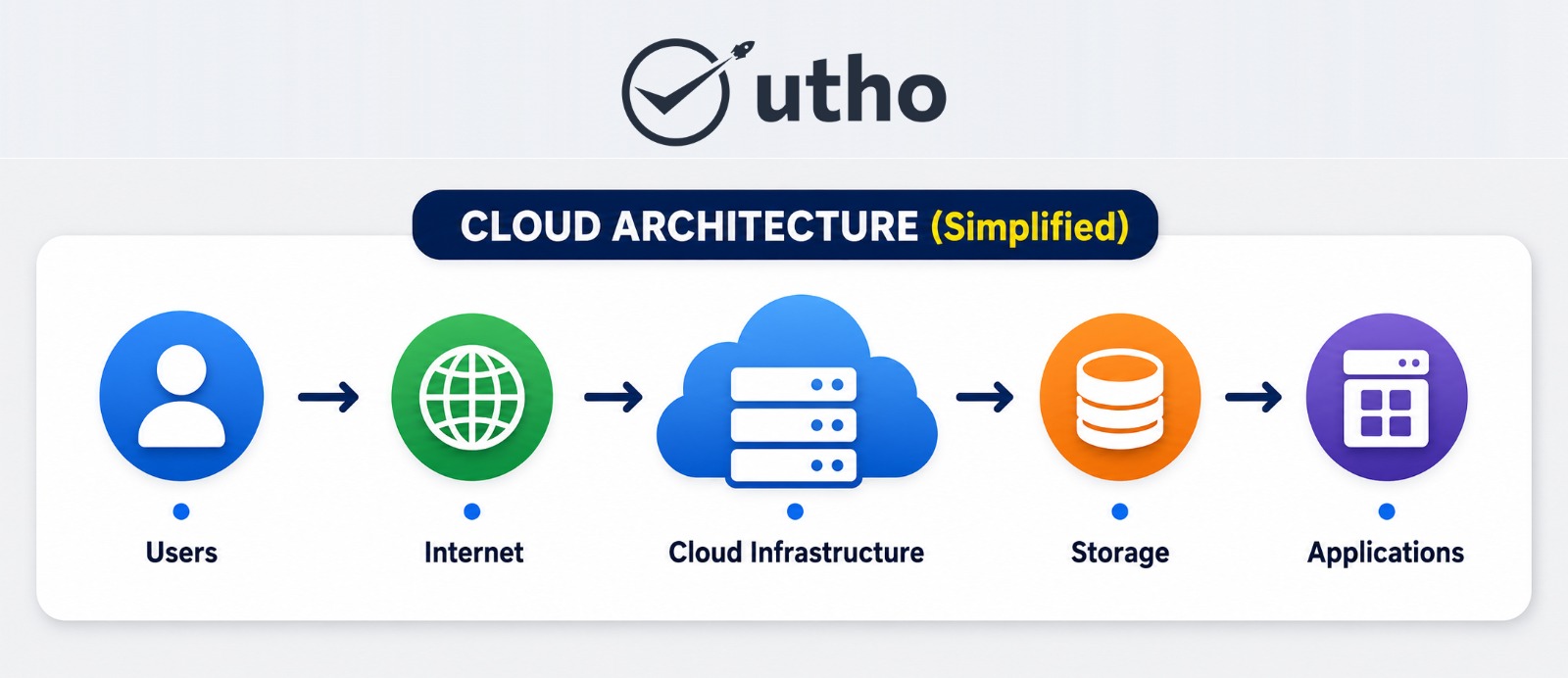
Cloud computing architecture is the structure of technologies, resources and services that work together to provide cloud computing services over the internet.
A well-designed cloud architecture enables organizations to achieve:
- High availability
- Scalability
- Security
- Performance
- Cost optimization
Cloud architecture is generally divided into two major components:
- Frontend
- Backend
These components communicate through the internet or private networks.
Frontend Architecture
The frontend represents everything users interact with directly.
This includes:
User Interfaces
Users access cloud services through:
- Web browsers
- Mobile applications
- Desktop software
- Cloud dashboards
Client Devices
Various devices connect to cloud resources:
- Laptops
- Smartphones
- Tablets
- Workstations
Applications
Frontend applications act as the bridge between users and cloud resources.
Examples include:
- Business software
- Collaboration tools
- Analytics platforms
- Customer portals
The frontend ensures a smooth user experience while communicating securely with backend infrastructure.
Backend Architecture
The backend contains the infrastructure that powers cloud services.
Compute Resources
Compute resources include:
- Physical servers
- Virtual machines
- Containers
- GPU instances
These resources process workloads and run applications.
Storage Systems
Cloud storage allows organizations to store:
- Documents
- Images
- Videos
- Databases
- Backups
Modern cloud platforms provide highly durable and scalable storage environments.
Networking Infrastructure
Networking connects all cloud resources and enables communication between:
- Applications
- Databases
- Users
- Services
Networking components include:
- Load balancers
- Firewalls
- Virtual networks
- DNS services
Security Components
Cloud security includes:
- Encryption
- Identity management
- Access controls
- Threat monitoring
- Firewall protection
Security remains one of the most important aspects of modern cloud architecture.
Management Layer
The management layer automates:
- Resource allocation
- Monitoring
- Billing
- Scaling
- Security policies
Automation significantly reduces administrative overhead.
How Cloud Architecture Works
The cloud architecture process typically follows these steps:
- A user requests a resource.
- The request reaches the cloud provider.
- Backend systems process the request.
- Resources are allocated automatically.
- The requested service is delivered.
- Usage is monitored and billed accordingly.
This entire process often takes only seconds.
Why Is Cloud Computing Important in 2026?
Cloud computing has become essential because businesses need to respond quickly to changing market demands while keeping costs under control and maintaining strong security.
Organizations today need infrastructure that is:
- Flexible
- Reliable
- Secure
- Scalable
- Cost-efficient
Cloud computing fulfills all these requirements.
1. Faster Business Growth
Cloud infrastructure allows businesses to launch applications and services quickly.
Instead of waiting weeks for hardware procurement, resources can be deployed within minutes.
This speed enables:
- Faster product launches
- Shorter development cycles
- Rapid experimentation
2. Cost Efficiency
One of the biggest advantages of cloud computing is cost optimization.
Organizations avoid:
- Hardware purchases
- Data center expenses
- Maintenance costs
- Infrastructure upgrades
Instead, they pay only for the resources they consume.
This pay-as-you-go model improves budget management and operational efficiency.
3. Scalability on Demand
Business workloads often fluctuate.
Cloud platforms allow organizations to:
- Increase resources during peak demand
- Reduce resources during low activity
This elasticity prevents both underutilization and overprovisioning.
For example, an e-commerce platform can automatically scale during major sales events and return to normal capacity afterward.
4. AI and Machine Learning Enablement
A major reason cloud adoption continues to accelerate in 2026 is the rise of AI.
Cloud providers now offer:
- GPU infrastructure
- AI model training environments
- Machine learning platforms
- Generative AI services
Businesses can access advanced AI capabilities without purchasing expensive hardware.
5. Support for Remote and Hybrid Work
Cloud services enable employees to work securely from virtually anywhere.
Teams can access:
- Applications
- Documents
- Databases
- Collaboration tools
This flexibility improves productivity and business continuity.
6. Improved Security
Modern cloud providers invest heavily in security technologies.
Organizations benefit from:
- Data encryption
- Multi-factor authentication
- Threat detection
- Automated monitoring
- Disaster recovery systems
For many businesses, cloud security capabilities exceed what they could implement independently.
7. Global Reach
Cloud infrastructure allows businesses to deploy applications closer to customers worldwide.
Benefits include:
- Lower latency
- Better performance
- Improved customer experience
- Faster content delivery
This capability is especially important for organizations operating across multiple regions.
8. Sustainability and Green IT
Sustainability has become a major business priority.
Modern cloud providers optimize:
- Energy consumption
- Server utilization
- Cooling systems
- Infrastructure efficiency
As a result, cloud computing often reduces environmental impact compared to traditional data centers.
9. Enhanced Innovation
Cloud computing enables organizations to experiment with new technologies without major upfront investments.
Teams can quickly test:
- AI applications
- Analytics platforms
- IoT solutions
- Blockchain systems
- Modern software architectures
This encourages innovation and accelerates digital transformation.
Types of Cloud Computing
Cloud computing environments can be categorized based on how infrastructure is deployed and managed. Choosing the right deployment model depends on factors such as security requirements, compliance regulations, performance expectations, workload sensitivity, and budget.
In 2026, organizations increasingly adopt a combination of cloud environments rather than relying on a single deployment model. This approach improves flexibility, resilience, and cost efficiency.
1. Public Cloud
A public cloud is a cloud environment where computing resources are owned, managed, and operated by a cloud service provider and delivered to customers over the internet.
In this model, multiple customers share the provider’s infrastructure while maintaining logical separation of their resources and data.
Characteristics of Public Cloud
- On-demand resource provisioning
- Pay-as-you-go pricing
- High scalability
- Global availability
- Minimal infrastructure management
- Fast deployment
Benefits of Public Cloud
Lower Costs
Organizations avoid capital investments in hardware, networking equipment, and data center facilities.
Rapid Deployment
Resources can be provisioned within minutes rather than weeks or months.
Elastic Scaling
Businesses can quickly adjust infrastructure capacity according to demand.
Global Reach
Applications can be deployed across multiple regions for improved performance.
Best Use Cases
Public cloud is suitable for:
- Startups
- SaaS companies
- Web applications
- Development environments
- AI workloads
- E-commerce platforms
- Mobile applications
Example
A startup launching an online marketplace can deploy virtual machines, storage, databases, and networking resources through a public cloud provider without purchasing physical infrastructure.
2. Private Cloud
A private cloud is a cloud environment dedicated exclusively to a single organization.
The infrastructure may be hosted:
- On-premises
- In a private data center
- Through a dedicated cloud provider
Unlike public clouds, resources are not shared with other organizations.
Characteristics of Private Cloud
- Dedicated infrastructure
- Enhanced control
- Custom configurations
- Greater data isolation
- Higher security controls
Benefits of Private Cloud
Greater Control
Organizations maintain more control over infrastructure, security policies, and compliance requirements.
Enhanced Security
Private environments provide stronger isolation for sensitive workloads.
Compliance Support
Industries with strict regulatory requirements often prefer private cloud deployments.
Best Use Cases
Private cloud environments are commonly used by:
- Financial institutions
- Government agencies
- Healthcare organizations
- Defense organizations
- Large enterprises
Limitations
Private clouds generally involve:
- Higher deployment costs
- Infrastructure management responsibilities
- Reduced elasticity compared to public cloud
3. Hybrid Cloud
A hybrid cloud combines public cloud infrastructure with private environments or on-premises infrastructure.
This approach allows organizations to place workloads where they perform best while maintaining flexibility.
How Hybrid Cloud Works
Organizations may:
- Keep sensitive data in private environments
- Run customer-facing applications in public cloud
- Move workloads between environments as needed
Benefits of Hybrid Cloud
Flexibility
Different workloads can run in different environments.
Cost Optimization
Businesses can leverage public cloud resources while retaining critical systems privately.
Business Continuity
Workloads can be distributed across multiple environments.
Compliance Support
Sensitive workloads remain in controlled environments while other applications benefit from public cloud scalability.
Best Use Cases
Hybrid cloud is widely used by:
- Banks
- Healthcare providers
- Retail companies
- Manufacturing organizations
- Government institutions
4. Multi-Cloud
One of the fastest-growing cloud strategies in 2026 is multi-cloud adoption.
A multi-cloud strategy involves using services from multiple cloud providers simultaneously.
For example, an organization might use:
- One provider for AI workloads
- Another for disaster recovery
- Another for database services
Why Multi-Cloud Is Growing
Businesses want to:
- Avoid vendor lock-in
- Improve resilience
- Optimize costs
- Access specialized services
- Increase geographic coverage
Benefits of Multi-Cloud
Reduced Risk
Service disruptions from one provider do not affect the entire organization.
Greater Flexibility
Organizations can choose the best services from each provider.
Cost Optimization
Workloads can be placed where pricing is most favorable.
Challenges
Multi-cloud environments require:
- Strong governance
- Monitoring tools
- Security standardization
- Cost management practices
Despite these challenges, multi-cloud has become a preferred strategy for many enterprises in 2026.
Cloud Computing Service Models
Cloud deployment models describe where infrastructure runs, while cloud service models define what services are delivered.
The three primary service models are:
- Infrastructure as a Service (IaaS)
- Platform as a Service (PaaS)
- Software as a Service (SaaS)
A fourth model, Function as a Service (FaaS), has also gained significant popularity.
Infrastructure as a Service (IaaS)
Infrastructure as a Service provides virtualized computing resources over the internet.
Organizations rent infrastructure instead of purchasing hardware.
Typical IaaS resources include:
- Virtual machines
- Storage
- Networking
- Firewalls
- Load balancers
Benefits of IaaS
Maximum Flexibility
Organizations maintain control over operating systems and applications.
Cost Savings
No need to purchase physical servers.
Rapid Provisioning
Infrastructure can be deployed in minutes.
Common Use Cases
- Website hosting
- Development environments
- Disaster recovery
- Enterprise applications
- AI infrastructure
Platform as a Service (PaaS)
Platform as a Service provides developers with a complete environment for building, testing, and deploying applications.
The cloud provider manages:
- Hardware
- Networking
- Operating systems
- Middleware
Developers focus only on application development.
Benefits of PaaS
Faster Development
Teams can build applications without managing infrastructure.
Improved Productivity
Developers spend less time on operational tasks.
Simplified Deployment
Applications can be deployed quickly and consistently.
Common Use Cases
- Web application development
- Mobile applications
- API development
- DevOps pipelines
Software as a Service (SaaS)
Software as a Service delivers software applications through the internet.
Users access applications through web browsers without installing or managing software locally.
Benefits of SaaS
Easy Accessibility
Applications are available from any internet-connected device.
Automatic Updates
The provider handles upgrades and maintenance.
Subscription Pricing
Organizations pay predictable monthly or annual fees.
Examples
Popular SaaS applications include:
- Email platforms
- CRM systems
- Collaboration tools
- Project management software
- Video conferencing applications
Function as a Service (FaaS) and Serverless Computing
Serverless computing has become one of the fastest-growing cloud technologies.
Function as a Service allows developers to run code without managing servers.
Infrastructure provisioning happens automatically.
Benefits
- Reduced operational overhead
- Automatic scaling
- Faster development
- Lower costs for event-driven workloads
Common Use Cases
- APIs
- Chatbots
- AI workflows
- Data processing
- Event-driven applications
In 2026, serverless computing continues to expand as organizations seek greater efficiency and automation.
How Cloud Computing Works
Cloud computing operates through a network of interconnected servers, storage systems, virtualization technologies, and management platforms.
Although cloud infrastructure appears simple to end users, significant technology works behind the scenes.
Step 1: User Request
A user requests a service through:
- Browser
- Mobile app
- API
- Enterprise application
Step 2: Request Routing
The request travels through networking infrastructure to cloud systems.
Step 3: Resource Allocation
Cloud management software identifies and allocates the required resources automatically.
Step 4: Processing
Compute resources process workloads.
Examples include:
- Running applications
- Storing files
- Analyzing data
- Training AI models
Step 5: Service Delivery
Results are returned to the user through the internet.
Step 6: Monitoring and Billing
Cloud systems track usage for:
- Billing
- Security
- Optimization
- Performance management
This automation enables cloud platforms to support millions of users simultaneously.
Major Benefits of Cloud Computing
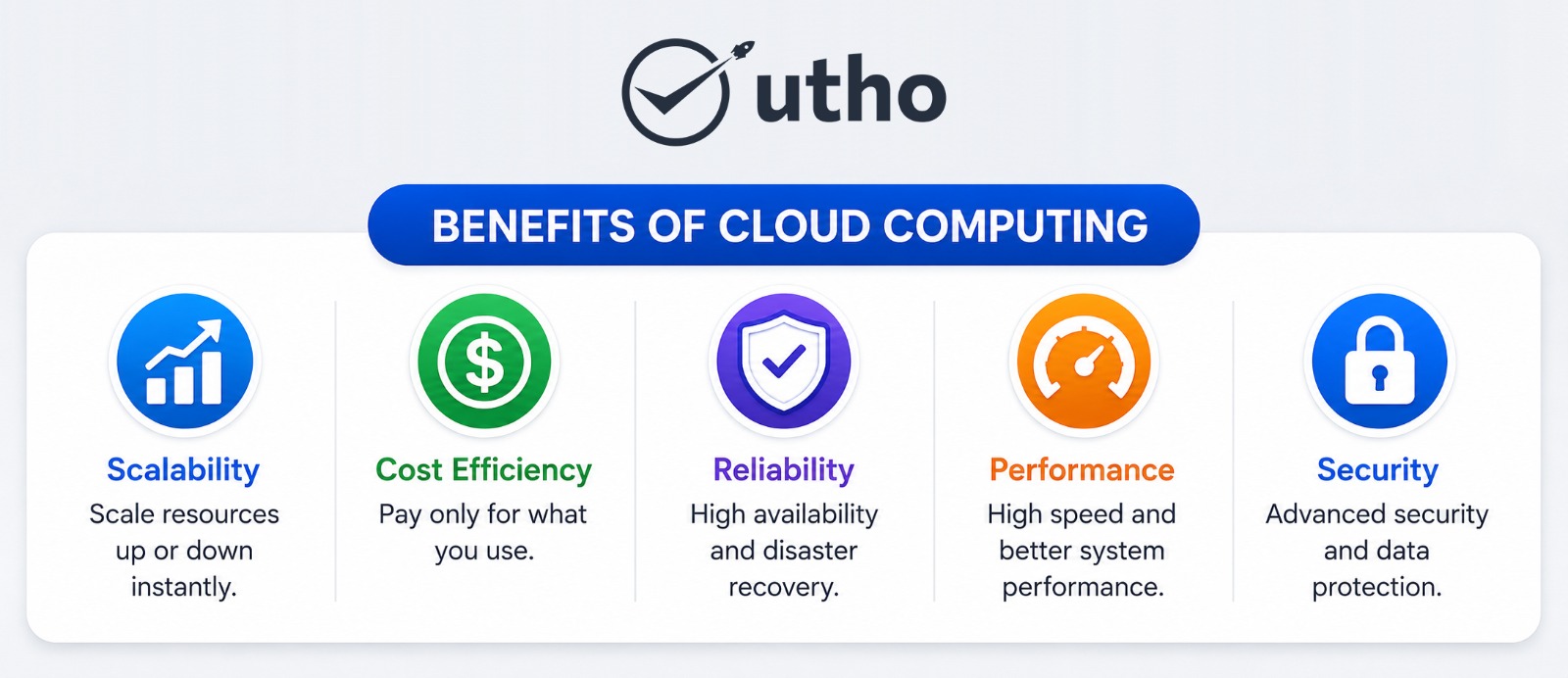
Cloud computing offers numerous advantages that have driven widespread adoption worldwide
Scalability
Resources can increase or decrease automatically based on demand.
Organizations no longer need to overprovision infrastructure.
Cost Savings
Businesses avoid:
- Hardware purchases
- Data center construction
- Infrastructure maintenance
The pay-as-you-use model improves financial efficiency.
High Availability
Cloud environments use:
- Redundant systems
- Multiple availability zones
- Failover mechanisms
This improves service reliability.
Faster Innovation
Teams can quickly deploy:
- Applications
- Databases
- AI services
- Analytics platforms
without lengthy procurement cycles.
Security Improvements
Modern cloud providers invest heavily in cybersecurity technologies.
Organizations gain access to:
- Encryption
- Identity management
- Threat detection
- Compliance frameworks
Cloud Security in 2026
Security remains one of the most important aspects of cloud computing.
However, cloud security has evolved significantly over recent years.
Today’s cloud environments incorporate advanced security capabilities that often exceed traditional on-premises infrastructure.
Key Cloud Security Technologies
Data Encryption
Data is protected during:
- Storage
- Processing
- Transmission
Identity and Access Management (IAM)
IAM controls who can access resources and what actions they can perform.
Multi-Factor Authentication (MFA)
Additional authentication layers reduce unauthorized access.
Zero Trust Security
Zero Trust has become a leading security model in 2026.
The principle is simple:
“Never trust, always verify.”
Every user and device must continuously prove its identity.
AI-Powered Threat Detection
Artificial intelligence now plays a major role in identifying:
- Suspicious activity
- Malware
- Data breaches
- Insider threats
Cloud security platforms can respond to threats in real time.
AI and Cloud Computing in 2026
Artificial intelligence is reshaping the cloud industry.
Many organizations now choose cloud providers based on their AI capabilities.
Cloud platforms offer infrastructure specifically designed for:
- Generative AI
- Machine learning
- Deep learning
- Large language models
- Data analytics
Why AI Needs Cloud Infrastructure
AI workloads require:
- Massive computing power
- High-performance storage
- Advanced networking
- Specialized GPUs
Cloud providers deliver these resources on demand.
Benefits of AI-Powered Cloud Platforms
- Faster AI development
- Lower infrastructure costs
- Scalable training environments
- Simplified deployment
- Improved business intelligence
The combination of AI and cloud computing is expected to remain one of the strongest technology trends throughout 2026 and beyond.
What Are the Disadvantages of Cloud Computing?
While cloud computing offers numerous benefits, organizations should also understand its potential challenges before migrating workloads. Proper planning and governance can help mitigate most of these limitations.
1. Downtime Risks
Although modern cloud providers offer high availability, service interruptions can still occur.
Downtime may result from:
- Network failures
- Hardware issues
- Power outages
- Software bugs
- Cyberattacks
- Human errors
For mission-critical applications, organizations should implement redundancy, backups, and disaster recovery strategies.
2. Vendor Lock-In
Vendor lock-in occurs when an organization becomes heavily dependent on a single cloud provider.
Challenges include:
- Complex migrations
- Data transfer costs
- Proprietary services
- Application compatibility issues
This is one reason why many enterprises are adopting multi-cloud strategies in 2026.
3. Security Misconfigurations
Cloud providers secure the infrastructure, but customers remain responsible for configuring their environments correctly.
Common mistakes include:
- Weak passwords
- Open storage buckets
- Excessive permissions
- Poor network segmentation
Most cloud security incidents result from configuration errors rather than provider failures.
4. Cost Management Challenges
Cloud platforms make it easy to provision resources quickly.
Without proper governance, organizations may face:
- Unused resources
- Overprovisioned infrastructure
- Unexpected billing
- Resource sprawl
This challenge has led to the rise of FinOps practices, which focus on cloud cost optimization.
5. Compliance Requirements
Industries such as healthcare, finance, and government often have strict regulations regarding:
- Data storage
- Data processing
- Data residency
- Privacy controls
Organizations must ensure that cloud deployments meet regulatory requirements.
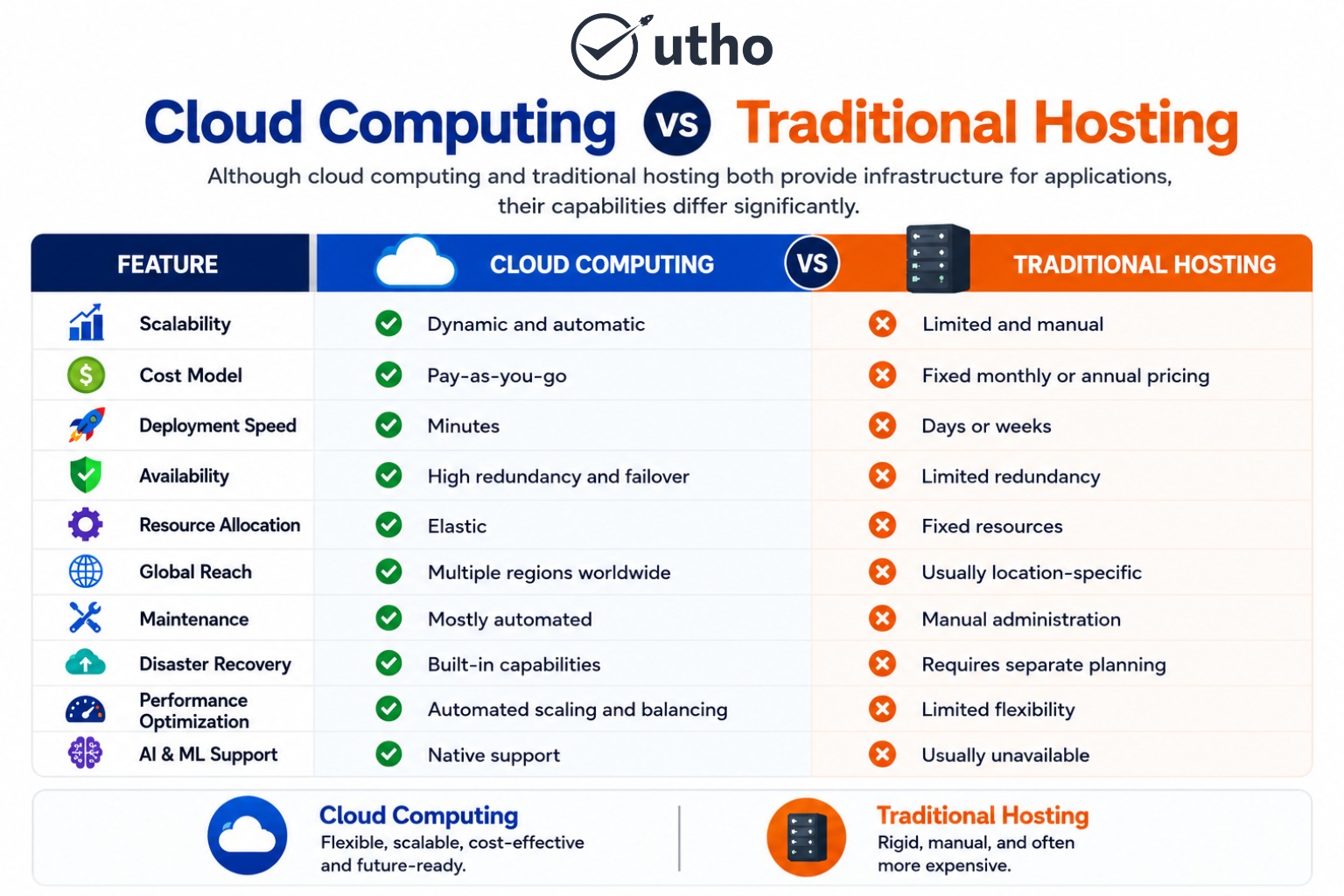
Which Option Is Better?
For most modern organizations, cloud computing offers significantly greater flexibility, scalability, and operational efficiency.
Traditional hosting may still be suitable for:
- Small static websites
- Legacy systems
- Specific compliance-driven environments
However, cloud computing has become the preferred choice for digital-first businesses.
Latest Cloud Computing Trends in 2026
Cloud technology continues to evolve rapidly. Organizations are increasingly using cloud platforms not only for infrastructure but also for innovation, automation, and competitive advantage.
Below are the most important cloud computing trends shaping 2026.
1. AI-Native Cloud Platforms
Artificial Intelligence has become one of the largest drivers of cloud adoption.
Organizations are increasingly deploying:
- Generative AI applications
- Large Language Models (LLMs)
- AI assistants
- Predictive analytics systems
- Intelligent automation solutions
Cloud providers now offer specialized infrastructure optimized for AI workloads.
Why This Matters
AI training and inference require:
- Massive computing power
- High-performance GPUs
- Advanced networking
- Scalable storage
Cloud platforms make these resources accessible without large upfront investments.
2. Multi-Cloud Adoption
Rather than relying on a single provider, organizations increasingly distribute workloads across multiple cloud platforms.
Benefits include:
- Reduced vendor dependency
- Improved resilience
- Better cost management
- Access to specialized services
Multi-cloud is becoming a standard enterprise strategy in 2026.
3. FinOps and Cloud Cost Optimization
As cloud spending grows, businesses are paying closer attention to cost management.
FinOps combines:
- Finance
- Engineering
- Operations
to optimize cloud spending.
Key FinOps Practices
- Rightsizing resources
- Monitoring utilization
- Eliminating waste
- Automating cost controls
- Forecasting cloud expenses
Cloud cost optimization has become a board-level priority for many organizations.
4. Edge Computing
Edge computing processes data closer to where it is generated.
Instead of sending all information to centralized cloud data centers, workloads can be processed near users or devices.
Benefits
- Lower latency
- Faster responses
- Reduced bandwidth usage
- Better real-time performance
Edge computing is particularly important for:
- IoT applications
- Smart cities
- Autonomous systems
- Manufacturing
- Telecommunications
5. Serverless Computing Growth
Serverless platforms continue to gain popularity.
Organizations benefit from:
- Faster development
- Lower operational overhead
- Automatic scaling
- Efficient resource utilization
Developers can focus on code rather than infrastructure management.
6. Platform Engineering
Platform engineering is emerging as a major trend.
Internal developer platforms help organizations:
- Standardize environments
- Improve productivity
- Accelerate deployments
- Reduce operational complexity
This trend supports modern DevOps and cloud-native development practices.
7. Green Cloud Computing
Sustainability has become a critical business objective.
Organizations increasingly evaluate cloud providers based on:
- Energy efficiency
- Carbon footprint
- Renewable energy usage
- Sustainable infrastructure practices
Cloud providers continue investing in environmentally responsible data centers.
8. Sovereign Cloud and Data Residency
Data sovereignty requirements are growing worldwide.
Organizations increasingly need:
- Local data storage
- Regional compliance
- Regulatory transparency
- Greater control over sensitive information
This trend is especially important for government agencies, healthcare providers, and financial institutions.
9. Cloud-Native Development
Cloud-native architectures continue to dominate application development.
Popular technologies include:
- Containers
- Kubernetes
- Microservices
- Service meshes
- DevSecOps pipelines
These technologies improve scalability, resilience, and deployment speed.
How Cloud Computing Helps Organizations
Cloud computing enables organizations to modernize operations while improving efficiency and reducing costs.
The impact extends far beyond IT infrastructure.
Faster Innovation
Organizations can launch products faster by accessing resources instantly.
Development teams can:
- Test ideas quickly
- Build prototypes
- Deploy applications globally
without waiting for infrastructure procurement.
Improved Customer Experience
Cloud-based applications deliver:
- Better availability
- Faster response times
- Consistent performance
These improvements enhance customer satisfaction.
Enhanced Collaboration
Employees can access shared resources securely from anywhere.
Cloud platforms support:
- Remote work
- Hybrid work
- Global collaboration
Better Business Continuity
Cloud-based disaster recovery solutions help organizations recover quickly from disruptions.
This minimizes downtime and operational risk.
Stronger Security
Modern cloud providers invest heavily in:
- Threat monitoring
- Identity management
- Security automation
- Compliance frameworks
Organizations benefit from enterprise-grade security capabilities.
Scalability for Growth
Cloud infrastructure allows businesses to scale resources according to demand.
Whether serving hundreds or millions of users, organizations can expand without major infrastructure investments.
What Is the Utho Cloud Platform?
Utho Cloud is India’s first public cloud platform designed to provide affordable, scalable, and high-performance cloud infrastructure for startups, SMBs, enterprises, developers, and growing digital businesses.
The platform offers cloud services that help organizations deploy and manage applications without the complexity often associated with large international cloud providers.
Utho focuses on:
- Simplicity
- Performance
- Cost transparency
- Scalability
- Local support
- Data sovereignty
As cloud adoption accelerates across India, organizations increasingly seek cloud platforms that combine enterprise-grade infrastructure with predictable pricing and local expertise.
Why Choose Utho Cloud Platform?
Cloud adoption often comes with challenges such as cost unpredictability, management complexity, compliance requirements, and performance concerns.
Utho addresses these challenges through a cloud platform designed for modern business needs.
Transparent Pricing
Many organizations struggle with unexpected cloud bills.
Utho provides:
- Simple pricing structures
- Transparent billing
- Predictable costs
- Better financial control
High-Performance Infrastructure
Applications require reliable infrastructure to maintain performance.
Utho offers:
- High-performance compute instances
- Scalable storage
- Modern networking capabilities
- Cloud-native infrastructure
Simplified Cloud Management
Managing cloud resources should not require extensive expertise.
The platform provides intuitive tools for managing:
- Virtual machines
- Networking
- Storage
- Security settings
Elastic Scalability
Businesses can scale resources according to demand.
This flexibility enables organizations to:
- Handle traffic spikes
- Support growth
- Optimize costs
without infrastructure limitations.
Security and Compliance
Security remains a top priority.
Utho supports:
- Access controls
- Network security
- Authentication mechanisms
- Compliance-focused deployments
Data Sovereignty
Organizations with data residency requirements can benefit from local infrastructure that supports regulatory and operational needs.
Local Expertise and Support
Access to local support teams helps organizations resolve issues quickly while navigating technical and compliance requirements more effectively.
Frequently Asked Questions (FAQs)
What is cloud computing in simple words?
Cloud computing is the delivery of computing services such as servers, storage, networking, and software over the internet instead of using local hardware.
What are the main types of cloud computing?
The primary deployment models are:
- Public Cloud
- Private Cloud
- Hybrid Cloud
- Multi-Cloud
What are the three major cloud service models?
The three primary service models are:
- Infrastructure as a Service (IaaS)
- Platform as a Service (PaaS)
- Software as a Service (SaaS)
Is cloud computing secure?
Yes. Modern cloud providers implement advanced security measures such as encryption, identity management, monitoring, and threat detection.
What is the biggest benefit of cloud computing?
Scalability is often considered one of the biggest advantages because organizations can adjust resources according to demand.
What is a hybrid cloud?
A hybrid cloud combines public cloud infrastructure with private environments or on-premises systems.
What is multi-cloud?
Multi-cloud refers to using services from multiple cloud providers instead of relying on a single provider.
Why is cloud computing important for businesses?
Cloud computing helps businesses reduce costs, improve scalability, enhance security, support remote work, and accelerate innovation.
What is serverless computing?
Serverless computing allows developers to run applications without managing servers. Infrastructure is provisioned automatically by the cloud provider.
What is cloud-native development?
Cloud-native development involves building applications using technologies such as containers, Kubernetes, microservices, and DevOps practices.
What is FinOps?
FinOps is a cloud cost management practice that helps organizations optimize cloud spending and improve financial accountability.
How does cloud computing support AI?
Cloud platforms provide the computing power, GPUs, storage, and networking required to train and deploy AI models.
What is edge computing?
Edge computing processes data closer to users or devices to reduce latency and improve performance.
Can small businesses use cloud computing?
Yes. Cloud computing is highly beneficial for small businesses because it reduces infrastructure costs and provides scalable resources.
What is the future of cloud computing?
The future of cloud computing includes AI-native infrastructure, multi-cloud environments, edge computing, sustainability initiatives, platform engineering, and increased automation.
Conclusion
Cloud computing has evolved from a convenient IT solution into the foundation of modern digital transformation. In 2026, organizations depend on cloud platforms to power applications, support AI initiatives, improve collaboration, enhance security, and scale operations efficiently.
The combination of scalability, flexibility, cost optimization, and innovation makes cloud computing essential for businesses of all sizes. Emerging trends such as AI-native cloud platforms, multi-cloud strategies, FinOps, edge computing, and sovereign cloud infrastructure continue to reshape how organizations build and manage digital services.
For businesses looking to modernize infrastructure while maintaining performance, security, and cost control, cloud computing provides a proven path forward. Platforms like Utho Cloud further simplify this journey by delivering scalable, transparent, and locally supported cloud infrastructure designed to meet the needs of modern organizations.